

Identifying and Avoiding Phishing Attempts
- Cyber Threats
- Account Security
Phishing is one of the most common types of cyber attack worldwide. Attackers use fraudulent e-mails, text messages, or phone calls to access sensitive information and private data. As the methods used by the culprits become more and more sophisticated – particularly due to the use of artificial intelligence – it is crucial for every user to identify the signs of phishing at an early stage and take proactive steps to prevent it.
What Is Phishing and Why Is It so Dangerous?
Phishing is when cyber criminals attempt to disguise themselves as a trusted party (such as a bank, package delivery service, or employer) in order to obtain sensitive data from their victims. It is a sub-area of social engineering, exploiting human psychology instead of purely technical vulnerabilities.
The attacker aims to get the user to click a harmful link or open a file attachment by putting them under time pressure or sending an emotionally manipulative message. The ultimate goal is usually identity theft for financial gain or to access internal company accounts.
Facts About the Current Threat Level Posed by Phishing
Massive increase: according to data from Kaspersky, around 2.6 million harmful e-mail attachments were registered in Germany in 2024 alone. The number worldwide was more than 125 million.
High frequency: in March 2025, around 347,413 phishing websites were identified worldwide. The record number was in March 2023, with more than 600,000 registered sites (source: APWG).
Financial losses: between 2013 and 2015, major players such as Facebook and Google were defrauded of a total of 100 million US dollars through targeted phishing campaigns.
What Phishing Methods Do Attackers Use Today?
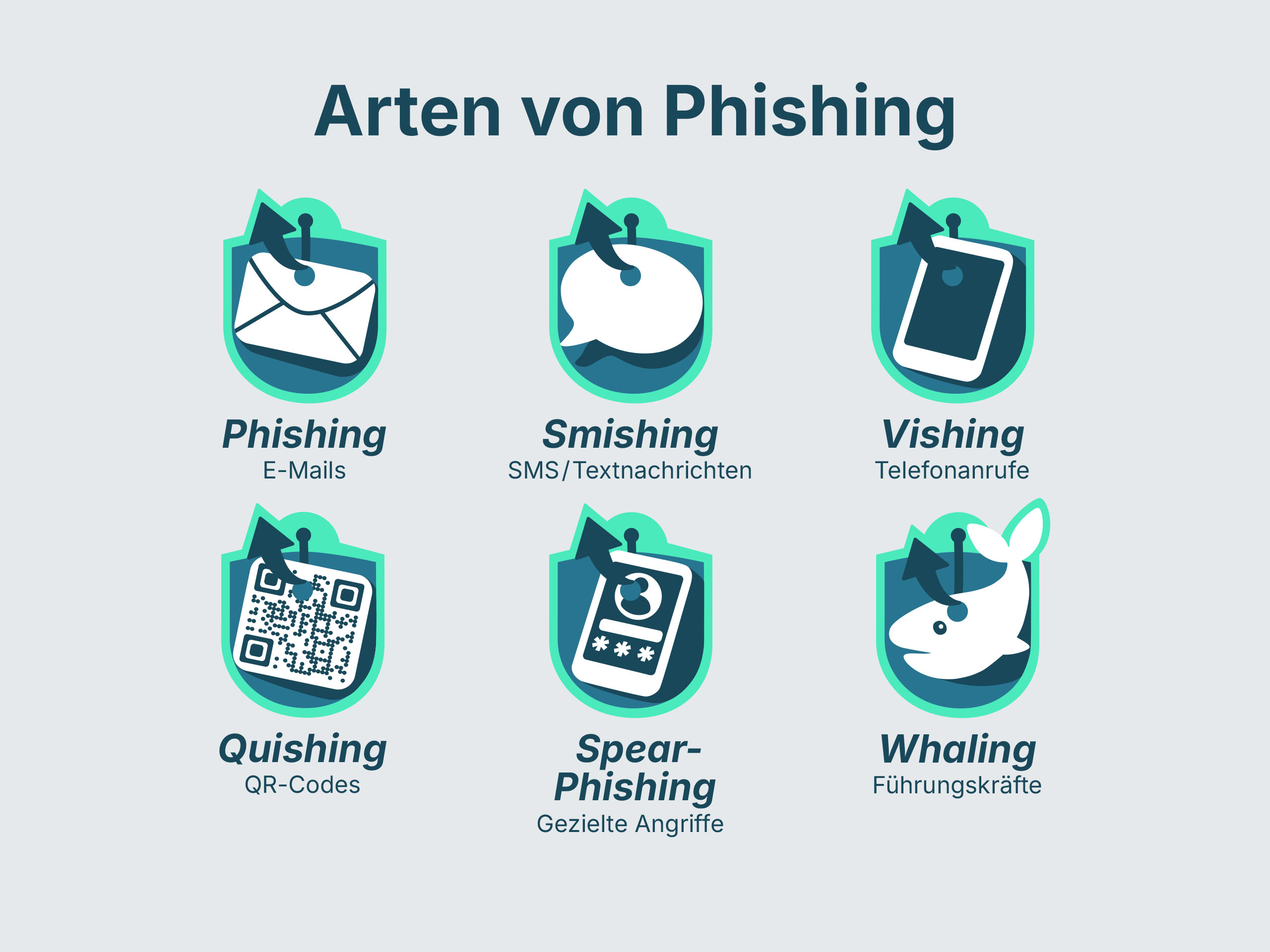
The classic e-mail is still the main method of phishing attacks. However, offenders are continuously expanding their repertoire to maximise the gains from their attacks.
1. Smishing: Phishing through SMS
Smishing is when you receive an SMS that often requires an urgent action. Typical scenarios include supposed issues with package deliveries or a verification request from your bank. The message contains a link that directs you to a fraudulent website.
Brands that are frequently affected and common scenarios:
DHL / GLS / FedEx: “Your package is ready for collection in store but customs charges of S$1.99 are due. Please pay here: [link].” (This classic is particularly common in periods running up to public holidays).
Amazon: “Security warning: your Amazon account has been locked temporarily. Please verify your identity at [link] to prevent its deletion.”
Google: “New login to your Google account detected on an iPhone 16. If that was not you, please secure your account immediately here: [link].“
Apple: “Important: your iCloud storage is full and backups can no longer be created. For 50 GB free of charge for 12 months, follow the link [link].“
Banks: “Your pushTAN procedure expires in two days. Please renew it here: [link].“
Tip: Serious companies such as DHL or Google will never send you an SMS prompting you to enter passwords or credit card data on a linked webpage. If you are unsure: delete the SMS, go to your provider's official app or website, and log in there manually.
2. Vishing: Fraudulent Phone Calls
Vishing (voice phishing) involves direct contact, where an attacker pretending to be a member of a support team or a government representative calls you requesting your access details or personal information.
3. Quishing: Danger Hidden Behind a QR Code
Quishing is when a harmful link is hidden in a QR code. The QR code is often physically placed on parking machines or advertisements. As the user is unable to identify the destination of the link immediately, he or she is more likely to scan it.
4. Special Kinds: Spear Phishing and Whaling
Whereas normal phishing is commonly encountered as spam, these methods are highly specialised:
Spear phishing: a targeted attack on a specific company or individual. The sender often uses the actual name of the victim to build trust.
Whaling: a form of spear phishing that targets company management (the “big fish”) to gain access to highly sensitive business information.
How Can You Identify a Phishing E-mail or Website?
How do we identify phishing e-mails? Despite all the technical advances, attackers often leave digital tracks. Phishing attacks can usually be identified by manipulated sender domains, extremely high levels of urgency, impersonal or unusual greetings, and links to suspicious websites. Once you know what to look out for, you can identify an attempted scam quickly.
| Characteristic | Suspicious sign (phishing) |
|---|---|
| Sender | The address appears cryptic or differs slightly from the original (e.g., @paypa1.com instead of @paypal.com). |
| Urgency | The message includes a threat to lock an account if you do not take immediate action. |
| Title | Instead of a specific name, a generic formula such as “Dear customer” is used. |
| Link | When you hover the mouse over the link, an unfamiliar destination website is shown. |
| Contents | Poor grammar, bad spelling, or unusual requests for money. |
How can you identify a fraudulent website? A fake website often copies the design of a well known bank or online shop almost perfectly. Always check the address bar in the browser. A secure website uses HTTPS, but be careful: many phishing sites now use SSL certificates to feign safety.
Prevention: How to Protect Yourself and Your Business
The best protection against phishing is a combination of technical precautions and personal responsibility. There is no such thing as seamless protection, but you can minimise the risk.
Technical Measures
Multi-factor authentication (MFA): this is the most important safeguard. Even if an attacker obtains your credentials, he or she cannot access your account without the second factor (confirmation via an app, for instance).
Spam filters and web filters: modern e-mail systems filter out the majority of spam messages automatically. Web filters also prevent you from opening websites that are known to be harmful.
Updates: always keep your software and firmware up to date. Many attackers exploit security vulnerabilities in out-of-date browsers to install malware as soon as you visit a page.
The Role of Security Awareness
Technology alone is not enough. Raising employee awareness is a crucial factor in any organisation.
Never click on links: if you receive a suspicious e-mail from your bank, you should always open their website manually through your browser instead of using the link in the message.
No attachments from people you do not know: harmful malware may be installed on your system when you open files.
Promote data transparency: understand what data belonging to you circulates online to proactively counter identity fraud.
Identity Protection in Focus: How omniac Helps
In a world where data leaks are a daily occurrence, transparency regarding what specific data has been exposed is essential. This is where omniac comes in. The app lets users keep an overview of their digital footprint.
Omniac actively searches for personal and business data such as e-mail addresses, passwords, phone numbers, or payment information in verified data leaks on the internet, deep web, and dark web. Users receive automatic warnings and guides to immediate measures such as changing passwords and taking security precautions. You can get omniac and benefit from round-the-clock monitoring for just S$1.48 per month or S$14.98 per year.
New Trends: AI Phishing and Automated Attacks
The threat posed by phishing continues to develop rapidly. Attackers are increasingly turning to artificial intelligence, which eliminates common identifiers such as poor spelling.
AI-generated messages: AI tools can create error-free and rhetorically convincing texts in seconds.
Phishing kits: attackers can buy pre-made kits for creating professional fraudulent websites with minimal effort from the dark web.
Deepfakes: vishing attacks often imitate the voices of people we know (for instance, our boss) using AI to underpin the urgency of their instructions.
Personal Responsibility Is the Best Protection
Phishing remains an ongoing challenge in the digital world. While technical solutions and filters provide an important basis, the last line of defence is in the hands of every individual user. A healthy scepticism in the face of unprompted messages, the consistent use of multi-factor authentication, and personal identity monitoring tools such as omniac let you reduce the risk of a successful attack significantly.
Frequently Asked Questions (FAQs) About Phishing
Disconnect the device from the internet immediately, change all your important passwords (using a different device), and inform your bank and your company’s IT department, if applicable.
Yes. Vishing involves obtaining your information through phone calls. Even just responding to an e-mail can confirm to your attackers that your address is active, leading to more spam.
No. Studies show that tech-savvy younger users are often the victims of phishing too, as they tend to respond to messages on their smartphones more quickly and without paying as much attention.
Attackers are constantly modifying their code and the servers they use to bypass filters. A small percentage always slips through. This is where personal security awareness comes in.
Omniac provides transparency regarding leaked data and enables users to take proactive action. If omniac informs you that your e-mail address or phone number has appeared in a data breach, you can respond immediately: change the affected passwords straight away and activate two-factor authentication (2FA). This knowledge also helps you look out for specific phishing attempts that use your personal information as bait. It takes passive information and turns it into an active increase in your personal security awareness.